


Grok Bot
4.8598.00 Reviews
App Specs
- Version
- 1.13.0
- Updated On
- License
- Free
- Downloads
- 1,000,000+
- Developer
- SpaceXAI
- Categories
- Productivity
- Platform
- Android
Screenshots
 Analysis by AppCompare
I can see why Grok Bot would catch someone’s eye during a busy week: instead of asking you to learn a complicated automation system, it invites you to describe the task you want handled. That conversational starting point makes experimentation feel approachable. The harder question is whether a helper like this earns a lasting place on your phone once the novelty of asking an AI to do things wears off. My view is that it has the clearest value for repeatable, well-defined chores—not for every task that happens to be annoying.
Easy to try, harder to judge
Grok Bot is a free productivity app from SpaceXAI, aimed at people who want AI agents to take on practical work. Its audience rating is 4.8 from around 9,100 ratings, and it has passed one million installs. Those figures suggest plenty of people are willing to try it, but they don’t tell me whether it will suit a particular routine. The useful test is simpler: can I explain a recurring task clearly, and does delegating it save enough attention to justify checking the result?
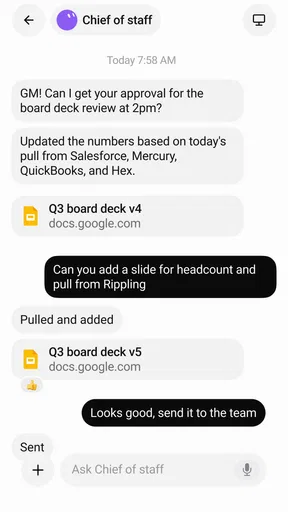
The first-week appeal is the low-friction idea behind the app. With many traditional automation tools, you begin by choosing triggers, actions, and conditions, then work out how those pieces fit together. Here, the intended starting point is plain language: tell the agent what you want automated. That can make the first attempt less intimidating for someone who has never built a workflow before.
There is a trade-off, though. A natural-language request can hide important assumptions. “Keep me on top of my work” is too broad to be a dependable instruction; “turn these incoming project updates into a short list of deadlines and questions I should answer” is more concrete. I’d treat the first prompt as a draft, not a magic command. State the trigger, desired result, and any boundaries in ordinary words, then inspect what the agent proposes before relying on it.
What a good first task looks like
Start with something small enough that you can tell whether it worked. For example, a freelancer could ask for a recurring way to sort routine admin requests into a short action list, while keeping unusual or sensitive messages for personal review. That is more useful than trying to automate an entire inbox on day one: the task has a recognizable input, a clear output, and an obvious point where human judgment remains valuable.
Another sensible trial is turning a repeated planning chore into a prepared summary. If you regularly gather notes before a weekly check-in, an agent might be useful for shaping the material into a consistent outline. The important measure is not whether the result sounds polished. It is whether you spend less time assembling it and still catch omissions before sharing it.
I would avoid beginning with anything where a mistaken action would be costly or hard to undo. An AI agent can interpret an instruction differently from its owner, especially when the request leaves room for judgment. For early experiments, favor tasks whose output you can review and correct. That gives you a practical sense of the app without turning a promising shortcut into a cleanup job.
Worth Reading Before You Choose

Baby Panda World Brings Quick Play to Modern Phones, but Its Game Library Feels Busy

ESPN’s Live Game View Makes Following Close Games Easier

QuizzLand Review: A Good Fit for Short Trivia Breaks, Not Every Player

Basketball Stars: Multiplayer Is Fast, but Can It Recover When Matches Go Wrong?

WEBTOON Turns Phone Updates Into a Better Reading Routine

Link to Windows Runs on Shared Habits, Not Social Feeds
A realistic first-week test could be preparing for a busy Monday. I might use a single instruction to turn a set of project notes into a brief list of pending questions, then compare that list with my own notes before acting. The useful result would not be an autonomous workday; it would be a clearer starting point that saves me from rereading everything. If the summary misses an important concern, I can correct the prompt or keep that task manual rather than expanding the experiment into something riskier.
Where recurring value can come from
After the first few experiments, the question changes from “Can it do something impressive?” to “Do I want this task handled the same way next week?” The strongest long-term case for Grok Bot is repetition. A small automation that removes a familiar nuisance every few days may be more valuable than an elaborate agent you try once and forget.
To judge that value, I’d keep a simple mental scorecard: how often the task occurs, how much attention it normally takes, and how often the result needs correction. If an agent produces a useful first pass but requires close editing each time, it may still help with drafting while failing as a hands-off solution. If it reliably handles the predictable portion and leaves exceptions to you, that division of labor can be worthwhile.
A useful, less obvious approach is to automate the preparation rather than the decision. For instance, have a workflow gather or organize information into a reviewable summary, then make the final choice yourself. This can preserve the time-saving benefit while limiting the risk of handing over a judgment call. It also gives you a clearer way to spot whether the agent is misunderstanding the task.
Another practical tip is to write instructions as though you were briefing a capable new colleague. Define what counts as a successful result, what should be left untouched, and when the agent should stop and ask for your attention. Even if the setup accepts casual language, a little precision can prevent repeated ambiguity. I would refine one instruction after observing a real result rather than packing every imaginable exception into the first prompt.
Grok Bot’s current version is 1.13.0, and it is listed for devices running Android 9 or later. That makes compatibility worth checking before building a routine around it, especially if you keep an older phone in service. The app is rated for Everyone, but that age classification does not replace common sense about the material you choose to involve in an automation. I would start with ordinary, low-stakes tasks and use only information appropriate for the job.
For month-to-month use, I’d also separate a task’s usefulness from the novelty of its presentation. A tidy summary may feel impressive the first time, yet become less valuable if you still have to reconstruct the context each week. A better recurring workflow starts from material you already collect and produces an output you actually use, such as a short agenda or a list of items to review. That connection to an existing habit matters: if using the agent requires a separate ritual of gathering inputs, the extra step can cancel out the convenience.
The upkeep behind “set it and forget it”
Automation rarely removes all work; it tends to move some of it from doing a task to maintaining the instructions. You may need to revisit a workflow when your schedule, priorities, or preferred output changes. If a process depends on context that shifts from week to week, the agent may need fresh guidance rather than a permanent, unchanged prompt.
That maintenance burden is easy to underestimate because describing a task feels quick. The real cost appears later: checking outputs, correcting edge cases, and deciding whether the automation is still useful. I’d review a new agent after its first few runs and ask whether it saves effort consistently. If it creates a new habit of monitoring another tool, it may not be a net improvement.
One way to keep maintenance manageable is to avoid making a single agent responsible for a sprawling chain of loosely related jobs. A narrow task is easier to evaluate and easier to repair when your needs change. It also makes failure more legible: you can tell whether the instruction was unclear, the input was unusual, or the result simply needed your judgment.
There is also a useful stopping rule. If you find yourself repeatedly rewriting the same instruction, pause before adding more complexity. Try removing ambiguity from the core request, or decide that the task is too variable to automate well. Not every recurring chore deserves an agent; sometimes a checklist or a calendar reminder is simpler, more predictable, and easier to keep current.
For a routine that changes with the season or workload, I would keep the instruction easy to revisit instead of treating its first version as permanent. A short note about the intended result and the boundary for human review can help you remember why the workflow exists. When the underlying chore changes, check whether the output still fits before letting the automation become part of your default routine. This is a modest maintenance habit, but it prevents an old shortcut from quietly producing work that no longer matches what you need.
When the novelty fades
The biggest source of fatigue is likely to be expectation management. “AI agents that do real work” is an appealing idea, but a conversational request still needs a clear goal and a sensible boundary. If you expect the app to infer your habits, preferences, and exceptions without guidance, the gap between expectation and result can wear thin quickly.
There is also a difference between a task that is tedious and one that is genuinely delegable. Reformatting information or preparing a first draft may have a repeatable shape. Choosing what deserves attention, handling a delicate exchange, or deciding how to respond to an unusual situation often calls for context that you may prefer to supply yourself. The app makes more sense as a helper for the predictable parts than as a substitute for your judgment.
For people already comfortable with rule-based automation, the comparison is not simply “AI versus old tools.” Conventional automation can be preferable when a task follows fixed conditions and must behave exactly the same way each time. Grok Bot’s natural-language approach may feel more approachable when the desired outcome is easier to explain than to translate into a sequence of rules. I would choose based on the task: fixed steps favor explicit rules; flexible preparation may be a better fit for an agent.
It may also be the wrong choice if you only need a one-time answer. An automation app is most compelling when you can reuse an instruction, not when a quick search or a note would solve the problem with less setup. Likewise, anyone who dislikes reviewing AI-generated work may find the oversight more irritating than the time saved. The practical question is not whether the app can participate, but whether its contribution reduces the work you care about.
There is a particular trade-off for people who already keep a reliable checklist or calendar routine. Those tools are less conversational, but their simplicity is an advantage when the job is just remembering a date or following a fixed sequence. I would not replace a dependable reminder with an agent unless the task involves enough preparation or organization to justify the extra layer. Keeping the old method for simple prompts and trying Grok Bot only on the messy preparation around them can make the comparison fair without disrupting a habit that already works.
Another source of fatigue is the urge to automate too much at once. A broad request may produce an output that feels helpful but is hard to judge, because several decisions are bundled together. Splitting the job into a reviewable preparation step and a separate human decision makes mistakes easier to catch. It also gives you a clean way to stop: if the prepared material is not useful, you can abandon that workflow without rebuilding the rest of your routine.
Grok Bot is free to install, with in-app purchases ranging from $10 to $300 per item. I’d consider that spending range before depending on paid capabilities for an important routine. Start by deciding what recurring task you want to improve and whether the free experience is enough for your trial; don’t commit to a purchase just because the first demonstration feels clever. The app’s value should come from repeated, observable time saved, not from the promise of future convenience.
For someone deciding whether to keep using it, the practical question is not simply whether the app is free to start. It is whether the workflow remains useful without creating a reason to spend more than the task is worth. I’d set a personal threshold before paying: the routine should solve a repeated problem, produce work I can check, and save enough attention that I would miss it if I stopped. If it does not meet that standard, returning to a manual method is a sensible outcome, not a failed experiment.
A lasting place depends on the chore
My long-term verdict is cautiously positive for people who can name a recurring, low-risk task and are willing to check the result. The conversational setup lowers the barrier to trying automation, and the best use cases are the ones where an agent can prepare, organize, or standardize work while you retain the final say. That is a more grounded promise than expecting an app to run your whole day for you.
I would recommend trying Grok Bot with one modest workflow, then judging it over several real uses. Does it remove a step you genuinely dislike? Can you spot and correct mistakes without spending longer than the original task took? Does the instruction remain useful when your routine shifts a little? Those answers matter more than the excitement of a first successful run.
SpaceXAI’s app is for Everyone, and its approachable premise could suit curious newcomers as well as people looking to simplify recurring admin. But it is not automatically better than a reminder, a checklist, or a conventional rule-based tool. Its lasting value comes from a narrow task it handles repeatedly, with enough human oversight to keep the result trustworthy. If you have that task, it is worth a careful trial; if your needs are mostly one-off or highly sensitive, a simpler option may earn more space in your routine.
Pros
- Provides quick answers to questions across a wide range of topics.
- Can summarize text and help brainstorm ideas.
- Supports conversational follow-up questions for more context.
- May access current information when web search is available.
- Offers image generation and analysis features
- depending on access.
Cons
- Some features require an X account or a paid subscription.
- Answers can be inaccurate
- so important claims should be checked.
- Web access and feature availability may vary by region and plan.
- Generated images or text may not match the prompt exactly.
- Sharing sensitive information with an AI service may raise privacy concerns.
FAQs for Grok Bot
What is Grok Bot?
Grok Bot is an AI assistant associated with Grok, designed to answer questions and help with tasks such as explaining topics, brainstorming ideas, summarizing text, and drafting content. The exact features depend on the version and platform you access, so check the app listing and publisher before downloading. Because third-party apps may use similar names, confirm that the developer and privacy information match the service you intend to use.
Is Grok Bot free to use?
Access and pricing can vary depending on where you use Grok Bot and which features are available in your region. Some versions may offer limited access at no cost, while advanced capabilities or higher usage limits may require a subscription or another paid plan. Review the current price, trial terms, and in-app purchase details on the official store page before signing up, and check whether a subscription renews automatically.
Does Grok Bot give accurate answers?
Grok Bot can provide useful explanations and suggestions, but its responses may contain errors, omit context, or rely on outdated information. Treat its output as a starting point rather than a definitive source, especially for medical, legal, financial, or safety-related questions. Verify important claims against reliable sources, and provide clear details when asking questions so the assistant has enough context to give a relevant response.
What information does Grok Bot collect, and is it safe to use?
The information collected depends on the specific Grok Bot app, its developer, and the privacy policy in effect. Before using it, review the store’s privacy disclosures and the app’s policy to understand how prompts, account details, device information, or usage data may be handled. Avoid entering passwords, financial details, confidential work material, or other sensitive information unless you have confirmed that the service’s data practices meet your needs.
How can I tell whether I am downloading the official Grok Bot app?
Search for Grok Bot through a trusted app store and carefully check the developer name, app description, permissions, and privacy policy before installing. Apps with similar names are not necessarily official or connected to the same service, so do not rely on the title or icon alone. If the listing’s publisher or download source is unclear, visit the service’s official website and follow its link to the correct Android or iOS app.


